Dark Web Monitoring Tools: How to Evaluate Them in 2026 (Buyer’s Checklist)
Table of contents
An infostealer log with a verified corporate password sells for $25 to $75 on Russian Market or 2easy. One with a working VPN or identity provider credential goes for $100 to $500. The log is usually listed within 48 hours of the infection, tested against live services within the first day, and packaged with the exact URLs where each credential was used. None of that requires a sophisticated attacker. It requires a buyer with $200 and a search filter for your domain.
That’s the problem a dark web monitoring tool is supposed to solve, and it’s also why so many security teams are shopping for one right now without a clear way to tell a strong tool from a well-marketed one. This guide is a checklist, not a pitch: what it actually costs you to get this wrong, seven things worth checking before you sign anything, who needs to be in the evaluation, what a real demo should show you, and the questions that separate a serious vendor from a dashboard with good marketing.
What actually counts as a dark web monitoring tool
A dark web monitoring tool scans forums, marketplaces, paste sites, and closed channels like Telegram and Discord for mentions of your organization, then alerts you when your data, credentials, or brand show up somewhere they shouldn’t. That’s the baseline. Where tools diverge is how they scan, what they catch, and who reviews a result before it lands in your inbox.
Two very different products get sold under the same name. Some are of course self-serve scanners: you enter a domain, get a dashboard, and do the analysis yourself. Others are managed services where analysts validate every alert before it reaches you, closer to Credential Intelligence or Cyber Threat Intelligence than a search engine. Neither model is automatically better, but they solve different problems, and half the disappointment security teams report with dark web monitoring tools comes from buying one type while expecting the other.
The real cost of getting this wrong
If you’re building a business case for this purchase, start here, because the numbers do most of the arguing for you.
IBM’s 2025 Cost of a Data Breach Report puts the global average breach cost at $4.44 million and the average time to identify and contain a breach at 241 days, a nine-year low, but still eight months. Break that down further and the case gets sharper: organizations that detect and contain a breach in under 200 days pay an average of $3.61 million. Organizations that take longer than 200 days pay $5.49 million, a $1.88 million gap that comes down almost entirely to speed of detection.
Credential-based breaches are worse than the average. IBM’s data shows breaches that start with a compromised credential take a mean of 246 days to identify and contain and cost $4.67 million on average, because a valid login doesn’t trip the alarms a malware infection would. That’s the exact scenario dark web monitoring is built to shorten: catching the credential the moment it’s listed for sale, not eight months later when it’s already been used.
Put plainly, the question isn’t whether dark web monitoring costs money. It’s whether the cost of a tool that shortens your detection window is smaller than $1.88 million, which for almost every mid-size or enterprise security budget, it is.
Why a one-time search isn’t monitoring
A manual dark web search finds what’s already been posted. Monitoring is what catches what gets posted an hour from now, at 2 a.m., on a Telegram channel nobody on your team has ever visited.
The same logic applies to open-web exposure, and it’s not hypothetical. In July 2026, a French exam-results site called Pechotonbac.fr disclosed the Bac 2026 results of roughly 730,000 candidates hours before the official release, not through a cyberattack, but because an API meant to activate later was switched on early. Nobody was watching that specific access point for the few hours it mattered. That’s the pattern dark web exposure follows too: a credential sits safely unused for months, then gets listed on a Monday night, and the only version of “monitoring” that catches it is the kind that’s running when it happens, not the kind that runs on a schedule.
Security teams have gotten comfortable running Google dorks against their own domain on a quarterly schedule, using operators from a cheat sheet to check for exposed files, login panels, or misconfigured servers. That’s a useful audit. It is not continuous, and an exposed file found in a Q1 dork sweep can sit unpatched for months before the next one. The dark web side of your exposure moves faster than that. Constella’s 2026 Identity Breach Report processed 51.7 million infostealer packages from 2025 alone, a 72% year-over-year jump, and CybelAngel’s own breakdown of that data puts the window between infection and marketplace listing at 24 to 48 hours. A quarterly check cannot close a 48-hour window. Only continuous monitoring can.
7 things to check before you sign anything
1. Source coverage, specifically named
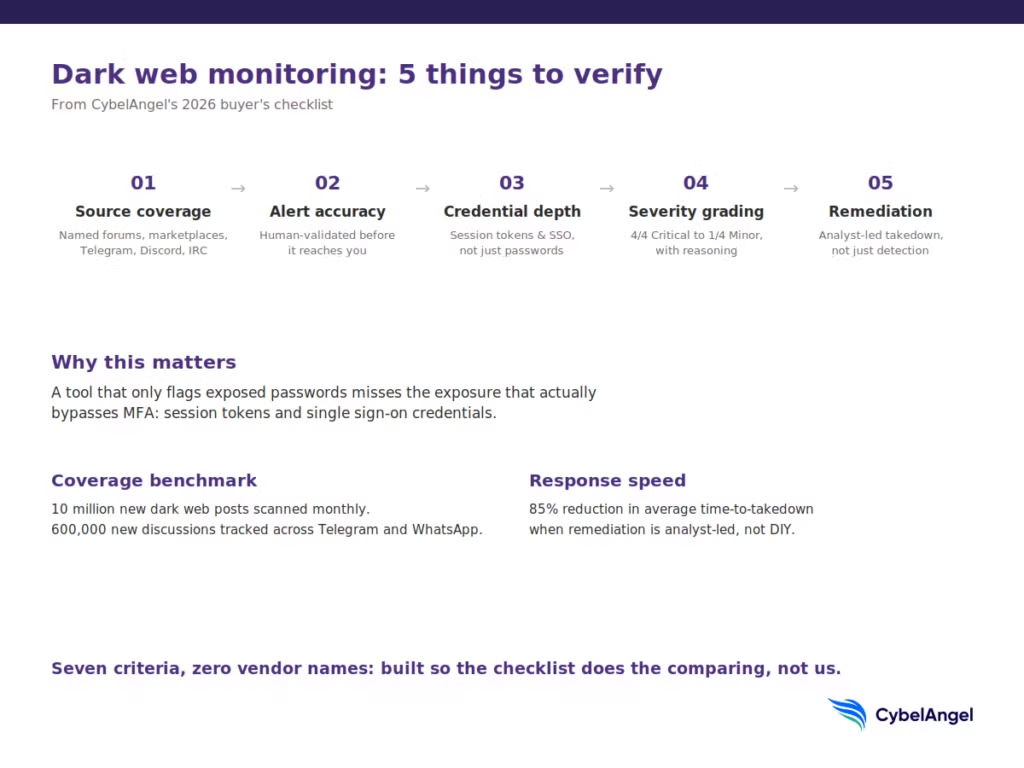
Ask which sources are actually covered: dark web forums, marketplaces, paste sites, Telegram, Discord, IRC, and closed groups on WhatsApp. Vague answers like “extensive coverage” or “the entire dark web” mean nothing; ask for a number. As a benchmark, CybelAngel’s Dark Web Monitoring module scans 10 million new dark web posts a month, tracks 600,000 new discussions across private Telegram and WhatsApp groups, and monitors 125,000 new threats across platforms including IRC and Discord. Use figures like that as the standard to hold every vendor to, not as a reason to skip the question.
2. What happens between detection and alert
A detection is not an alert, and an alert is not an incident. A detection is the system spotting a possible match. An alert is that detection surfaced to your team. An incident is what it becomes after a human confirms it’s real. Tools that skip the middle step flood you with unverified detections dressed up as alerts, and your analysts end up doing the vendor’s validation work for free. Ask what percentage of alerts get human review before they reach you, and ask to see a sample alert, not a marketing screenshot of one.
3. Credential and session-specific detection
Passwords aren’t the only thing worth catching. Session cookies and OAuth tokens let an attacker into an account without ever triggering multi-factor authentication, because the authentication already happened before the token was stolen. A tool that only flags exposed passwords misses the exposure that actually bypasses your MFA. Ask specifically whether the platform flags session tokens and SSO or identity-provider credentials, not just email and password pairs. This is also where Credential Intelligence and dark web monitoring should work together rather than as two separate purchases.
4. Severity grading you can act on
Every alert should come with a severity level and the reasoning behind it, not just a raw match. A live session token tied to your finance platform is a 4/4 Critical situation. A years-old forum post mentioning your company name in passing is a 1/4 Minor one. If a vendor’s platform treats both the same way, your team will spend more time triaging noise than responding to real risk.
5. What happens after the alert fires
Finding the exposure is half the job. Ask who takes the next step: does the vendor’s team draft the takedown request, contact the registrar, and confirm removal, or does that land back on your team? CybelAngel’s remediation service reports an 85% reduction in average time-to-takedown compared to organizations managing the process themselves, largely because the analyst who found the exposure is also the one who owns closing it.
6. Integration into how your team already works
A dark web monitoring tool that lives in its own dashboard, separate from your SIEM, SOAR, and ticketing system, becomes one more tab nobody checks by week three. Ask specifically about detection rules that feed your existing telemetry, automated ticket enrichment, and identity and access workflows, such as automatically flagging affected accounts for a forced password reset.
7. Fit for regulatory and third-party exposure
If part of your risk sits with vendors, suppliers, or a recent acquisition, ask whether the tool extends to third-party risk assessments and supports compliance reporting requirements relevant to your industry. A growing share of breaches now trace back to third parties rather than direct compromise, per Verizon’s 2025 DBIR, so a tool that only watches your own domain is watching half the problem.
See what’s already exposed under your own name. Request a demo.
Who should be in the room for this decision
Dark web monitoring gets evaluated badly more often because of who’s missing from the conversation than because of the tool itself. A well-run evaluation usually includes:
- The security leader (CISO or security director) who owns the budget conversation and needs the cost-of-inaction numbers from the section above to justify it upward.
- Whoever owns detection and response day to day (SOC lead, IR lead, or a senior analyst), because they’re the one who’ll actually triage the alerts this tool produces. If they’re not in the demo, you’ll find out post-purchase that the alert volume doesn’t fit their workflow.
- GRC or compliance, especially if third-party risk or regulatory reporting is part of the justification.
- Procurement or legal, earlier than usual if the vendor is analyst-backed rather than self-serve, since managed services often involve a different contract structure (staffing commitments, SLAs on response time) than software licensing.
Skipping the second one is the most common mistake. A tool that looks great in a sales demo but doubles your SOC’s alert queue is a tool your team will quietly stop checking within a quarter.
What a strong vendor demo actually shows you
A real alert, start to finish. Ask the vendor to show an actual (anonymized) alert: what triggered it, how it was scored, and what evidence backs the severity rating. If they can only show you a dashboard with counts and no example of the underlying reasoning, that’s worth noting.
The takedown or remediation workflow. Ask them to walk through what happens after an alert is confirmed real, who contacts the host or registrar, how long it typically takes, and how you’d know it’s resolved without checking manually.
An integration, live. Ask to see an alert actually land in a ticketing system or SIEM, not described in a slide. If the vendor can’t demo the integration your team would actually use, budget extra implementation time later.
Bring the questions from the checklist section into this call directly:
- How many new dark web sources did you add to your coverage in the last quarter?
- What’s your average time from a credential appearing on a marketplace to an alert reaching my team?
- Do I get a named analyst who knows our environment, or a shared queue?
- How do you verify a credential is still active before you alert me?
- What does a false positive look like in your system, and how often does it happen?
- If we’re compromised through a supplier, not directly, would you catch it?
Pricing: what actually drives the cost
Dark web monitoring pricing varies more than most security tooling because the underlying delivery models are so different. A few patterns worth knowing before you get a quote:
- Self-serve tools typically price per domain or per seat, and cost less because there’s no analyst layer behind the alerts.
- Managed, analyst-backed services price based on the breadth of what’s monitored (domains, brands, executive names, third parties) and generally cost more, because a human is validating and often remediating each finding.
- Bundled coverage costs less per capability than buying dark web monitoring, credential intelligence, and brand protection as three separate contracts from three separate vendors, if your organization needs more than one of them.
No vendor worth evaluating will give you a real number without understanding your domain count, brand footprint, and whether you want remediation included, so treat a generic price list with skepticism. The honest version of this section is: get a quote scoped to your actual footprint, and weigh it against the $1.88 million detection-speed gap from the cost-of-inaction section above, not against a competitor’s advertised starting price.
Implementation: how long until you have real coverage
This is where self-serve and managed models diverge most. Self-serve tools can be live within hours, since there’s little more than domain configuration involved, though initial results usually need manual triage until you’ve scoped out false positives yourself.
Managed services take longer to fully onboard, typically days to a few weeks, because setup includes scoping your actual domains, brands, and executive names, connecting your SIEM or ticketing system, and in many cases assigning a named analyst who needs context on your environment before their judgment calls are reliable. That upfront time is also usually why the alert quality is higher once it’s running. Ask any vendor for a specific week-by-week onboarding plan, not just a “quick and easy setup” claim, and treat vagueness on this point the same way you’d treat vagueness on source coverage.
A scorecard you can reuse internally
Score each vendor 1 to 4 using CybelAngel’s own severity scale (1 = Minor, 4 = Critical to your decision) and compare totals across your shortlist.
| Criteria | What good looks like | Score (1–4) |
|---|---|---|
| Source coverage | Named source count across forums, marketplaces, Telegram, Discord, IRC | |
| Alert accuracy | Human-validated alerts, low false-positive rate | |
| Credential depth | Flags session tokens and SSO credentials, not just passwords | |
| Severity clarity | Every alert graded with clear reasoning | |
| Remediation support | Analyst-led takedown, not just detection | |
| Integration | Connects to your SIEM, SOAR, and ticketing stack | |
| Third-party reach | Covers vendor and supply chain exposure | |
| Onboarding clarity | Vendor gives a specific week-by-week plan, not a vague promise |
What this looks like in practice
Lagardère’s CISO, Thierry Auger, summed up what changed after bringing in dark web monitoring: the team “found threats very specific to our company,” not generic industry noise. That distinction, specific versus generic, is the entire point of this checklist. A tool that tells you “credentials were found on the dark web” is doing a fraction of the job. One that tells you which credential, which platform, which marketplace, and when it appeared is doing the part that actually changes what your team does next. See the full Lagardère case study for the detection-to-resolution detail. For a broader read on how dark web threats have shifted heading into this year, CybelAngel’s 2026 dark web guide covers the threat actor and marketplace landscape this checklist is built to defend against.
Your common hesitations, addressed
“We don’t have budget allocated this quarter.” Most security budgets aren’t fixed for the year; they’re reallocated when a clear cost case exists. The $1.88 million detection-speed gap from IBM’s 2025 report is the argument, not a future planning cycle. A scoped quote costs nothing to obtain and gives you a real number to bring to that conversation.
“We already use a free breach checker.” Free tools generally check known, already-public breach databases. They don’t cover live marketplace listings, closed Telegram channels, or session-token exposure, which is where the fastest-moving threats actually circulate. They’re a reasonable baseline, not a substitute.
“Our team is already stretched thin.” This is an argument for analyst-backed monitoring, not against monitoring generally. The tools that add the most work are self-serve dashboards producing unvalidated detections your own analysts then have to triage. A managed service is built to reduce that load, not add to it, which is exactly what to test for on the demo call.
“We already have EDR and a SIEM, isn’t that enough?” EDR and SIEM watch what’s happening inside your environment. Dark web monitoring watches what’s already gotten out, credentials, documents, session tokens, before they’re used against you. They answer different questions, and a mature security stack generally has both rather than one instead of the other.
FAQs
A tool is typically self-serve software: you get a dashboard and interpret the results yourself. A service adds human analysts who validate alerts, add context, and often handle remediation. Most enterprise buyers end up wanting the service model once they see the volume of raw, unverified detections a tool-only product produces.
Pricing varies widely by coverage breadth and whether analyst validation is included, typically scaling with the number of monitored domains, brands, or employees rather than a flat fee. Vendors that include human-verified alerts and remediation support generally price higher than self-serve scanners, reflecting the labor behind each alert.
Free tools generally check a narrow set of known breach databases and lack coverage of closed forums, Telegram channels, and active marketplaces where credentials are actually sold. They can be a reasonable starting point for basic awareness, but they miss the sources where 2026’s fastest-growing threats, like infostealer logs, actually circulate.
Dark web monitoring covers mentions of your organization, brand, and data across dark web sources Credential intelligence focuses specifically on compromised email and password pairs tied to your domains. The two overlap and work best paired together rather than purchased as substitutes for each other.
Implementation for a managed service typically takes days to a few weeks, covering domain and brand configuration, integration with existing security tools, and initial baseline scanning. Self-serve tools can be live within hours, though initial results usually need manual triage until coverage is properly scoped.
Do I need dark web monitoring if my internal security is strong? Yes, because most exposure enters through channels your internal security never touches: an employee’s personal laptop, a contractor’s device, or a third-party vendor’s breach puts the average global breach cost at $4.44 million, and a meaningful share of those breaches originate outside the organization’s own perimeter entirely.
Run this checklist and the scorecard against your shortlist before your next vendor call. If budget or timing is the open question rather than fit, the cost-of-inaction numbers above are the place to start that conversation internally, not a reason to wait for the next planning cycle.
About the author