Cloud Security Best Practices: 24 Controls for 2026
Table of contents
In June 2025, researchers discovered what is likely the largest credential exposure in history: 16 billion login credentials compiled from infostealer malware logs and prior breaches, covering Google, Apple, Meta, and thousands of enterprise platforms. No single company was targeted, the leak simply revealed that years of credential reuse, inactive accounts, and missing MFA had accumulated into a systemic exposure available to any attacker willing to buy access. One month later, Allianz Life Insurance and TransUnion both suffered major breaches via compromised cloud CRM credentials, the same playbook, the same root cause.
Cloud intrusions rose 37% year-over-year in 2025, accelerating from 26% growth in 2024 according to CrowdStrike. IBM’s 2025 Cost of a Data Breach Report puts the average breach cost at $4.44 million globally — and $10.22 million for US organisations. Gartner’s assessment is blunter: through 2026, 99% of cloud security failures will be the customer’s fault, primarily due to misconfigurations.
The attack surface expands with every new SaaS tool, workload, and service account — and most of those additions happen faster than security teams can track. The 24 controls below are organised by risk category, and each of these includes a specific action step your team can take today.
What is cloud security?
Cloud security is the set of controls that protect the data, identities, and workloads you run in the cloud. It covers how you manage access, configure services, and monitor activity across the platforms your teams rely on. Because most organizations now use a mix of cloud providers, security also means keeping policies consistent as resources move between environments.
Every provider secures its own infrastructure, and you’re responsible for the workloads and configurations you deploy. That shared model creates an attack surface that changes quickly. Strong cloud security keeps that surface manageable and gives you the visibility to spot issues before they turn into real risk.
Figure 1: Summary video of what cloud security looks like. (Source: IBM)
Why cloud security is important
In 2025, cloud intrusions grew 37% — 154% more organisations reported significant cloud breaches year-over-year according to SentinelOne. The Google Cloud Threat Horizons Report for H1 2026 found that in the first half of 2025, threat actors relied heavily on weak or missing credentials and misconfigurations for initial access. By H2 2025 they had begun pivoting toward unpatched third-party vulnerabilities, exploiting them within under an hour of workload creation in some cases. The threat is accelerating, not stabilising.
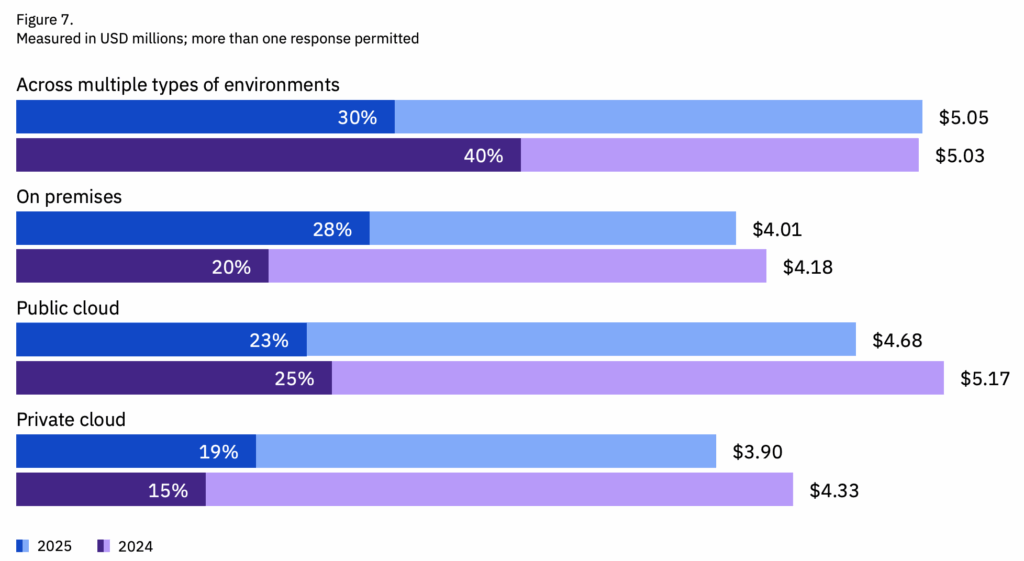
Three statistics define the current cloud risk landscape: 70% of cloud breaches originate from compromised identities. Misconfigurations account for 95% of cloud security failures and are present in an average of 43 per cloud account. And multi-environment breaches — spanning cloud and on-premises — take an average of 276 days to identify and contain, costing $5.05 million on average.
The IBM and Microsoft data below provides additional context. But the pattern is consistent: the controls that stop cloud breaches are not new or complex. They just need to be applied consistently.
Identity remains the most reliable entry point for attackers. Microsoft’s Digital Defense Report has logged 600 million identity attacks per day, with cloud environments being the principal target. Threat actors such as Octo Tempest are showing increasingly sophisticated attack methods, like federating domains to appear like valid users.
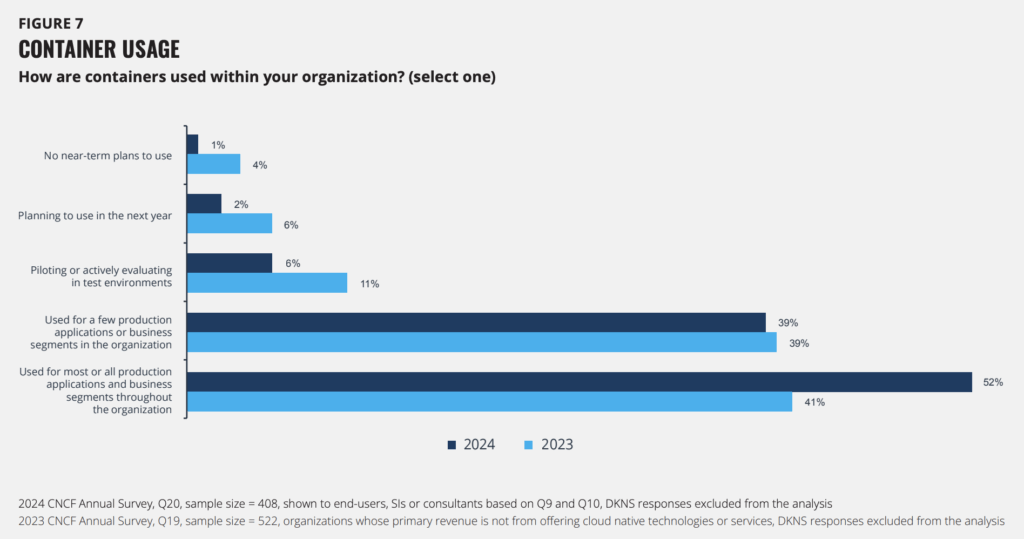
And cloud workloads themselves are multiplying. CNCF’s annual survey found that 91% of organizations are using containers in production, although 37% cite security concerns around these.
Cloud computing is here to stay, but here are 24 security measures that every team can adopt. For simplicity’s sake, we’ve subcategorized them under:
- Identity and access management
- Cloud configuration and posture management
- Multi-cloud environment management
- Workload, network, and API management
- Monitoring, detection, and response
Without further ado, here are 24 cloud security best practices that you need to implement.
Strengthen identity and access controls
Identity is the most common point of entry in cloud attacks. Most incidents start with compromised credentials or permissions that have drifted over time. For example, leaked credentials account for up to 65% of cloud breaches. But strong access controls can stop these in their tracks.
1. Enable MFA everywhere
Enforce FIDO2 or device-bound passkeys for all privileged accounts. Audit for “ghost logins,” local username/password accounts that remain valid even after SSO is enabled. In July 2025, both the Allianz Life and TransUnion breaches were executed via compromised cloud CRM credentials without MFA. This is not a new attack pattern, it is the default attack pattern.
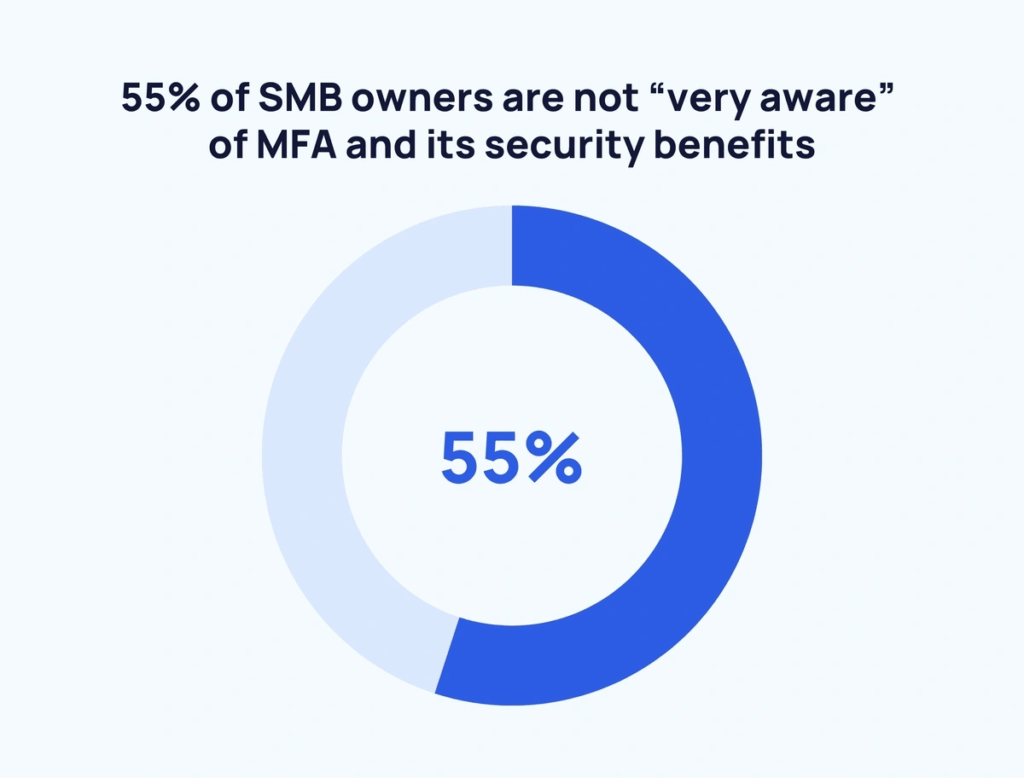
Any account without MFA enforcement is an open door, and the good news is that the use of MFA ‘makes you 99% less likely to be hacked, according to CISA.
2. Apply least privilege across all cloud roles
Permissions drift quickly in cloud environments, especially when teams move fast or rely on temporary fixes. Least privilege keeps identities tightly scoped so a single compromise doesn’t expose an entire environment. Regularly reviewing roles, trimming unused access, and tightening administrative paths makes it harder for attackers to move laterally if they gain a foothold.
3. Standardize IAM policies across cloud providers
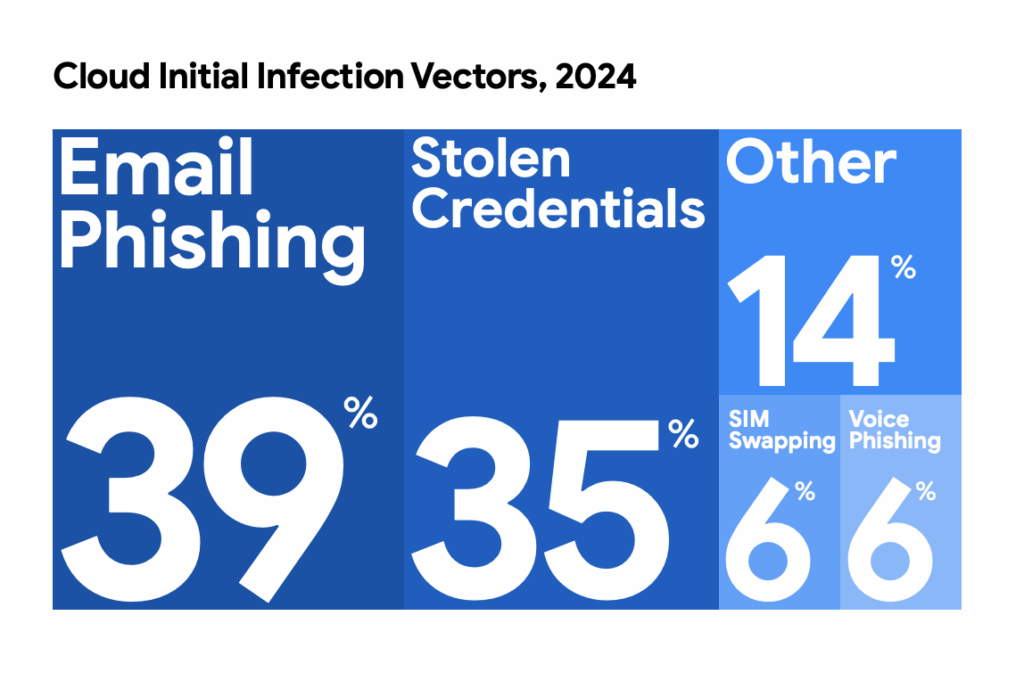
Each cloud platform handles roles and permissions differently, which makes it easy for policies to drift as teams deploy new services. That drift creates gaps that attackers often exploit through credential theft and social engineering. For instance, 39% of initial cloud attacks start with email phishing. Standardizing IAM rules across AWS, Azure, and GCP gives you predictable access paths and reduces the chance that a single misaligned policy becomes a cloud entry point.
4. Remove hard-coded credentials and rotate keys regularly
Static credentials are one of the easiest ways for attackers to gain cloud access, especially when they’re embedded in code, stored in repos, or shared across teams. Removing hard-coded keys and rotating secrets on a predictable schedule reduces the impact of a single leak. Using managed secret stores also helps you control who can access sensitive tokens as your environment grows.
Enable GitHub Advanced Security secret scanning on all repositories. In 2025, Mandiant responded to a breach where a compromised NPM package stole a developer’s GitHub token, the attacker used it to abuse a GitHub-to-AWS OIDC trust relationship and gain administrator access to the entire cloud environment within 72 hours. Store all secrets in AWS Secrets Manager, HashiCorp Vault, or Azure Key Vault and rotate on a 90-day cycle.
5. Disable inactive identities and service accounts
Many issues come from “long-lived cloud credentials.” Cloud environments accumulate unused accounts quickly, especially when projects end or workloads shift. Those inactive identities often retain broad permissions and go unnoticed during regular reviews, giving attackers an easy target if credentials are ever exposed. Disabling or removing stale accounts helps shrink your attack surface and keeps your access paths limited to what your teams actually use.
Set an automated policy to disable any identity inactive for 30 days and delete after 90. In 2025, the 16 billion credential mega-leak included credentials dating back years (but still valid because they had never been rotated or deactivated). Contractor accounts, demo accounts, and project-specific service accounts are the most commonly overlooked and most frequently exploited.
Improve cloud configuration and posture management
Cloud environments change constantly, which makes it easy for small configuration errors to accumulate and create real exposure. Strong cloud security posture management helps you spot and fix those issues early on.
6. Understand the shared responsibility model
Every cloud provider draws a line between what they secure and what you secure, and that line shifts depending on the service you’re using. Misunderstanding those boundaries leaves gaps that attackers can take advantage of. Mapping responsibilities across IaaS, PaaS, and SaaS helps your teams know exactly where to focus and prevents assumptions from turning into misconfigurations.
7. Monitor misconfigurations in real time with CSPM
Cloud services launch quickly, and each deployment creates new settings that can drift from your baseline before anyone notices. Real-time posture monitoring helps you catch risky configurations the moment they appear, instead of waiting for an audit or an alert from another team. Cloud security posture management (CSPM) tools give you a consistent view across providers so you can address issues before they expose sensitive data.
8. Limit public exposure of cloud resources
Accidentally exposing a storage bucket, database, or service to the internet is one of the fastest ways to create a cloud breach. These settings often change as teams test new workloads or share data, and they don’t always get switched back. Regularly checking which assets are publicly reachable helps you catch these mistakes early and keep sensitive information out of reach.
9. Regularly audit cloud configurations
23% of cloud compromises happen due to misconfigurations. Cloud settings shift as teams deploy new services, update workloads, or hand projects between groups. Those changes can introduce small misconfigurations that stay hidden until an incident forces them into view. Regular audits help you catch these early on.
10. Leverage agentless vulnerability management
Traditional scanning tools often struggle in cloud environments because they depend on agents that teams forget to deploy or maintain. Agentless scanning removes that gap by inspecting resources through cloud APIs, giving you visibility the moment a new workload appears. This helps you spot vulnerable services faster and build a more accurate picture of your cloud attack surface.
Protect data across multi-cloud environments
Data moves constantly between cloud services, storage layers, and applications, which makes it harder to keep track of where sensitive information lives. Strong data protection reduces the chance that an exposed bucket, weak key, or misrouted transfer becomes a breach.
11. Encrypt data at rest and in transit
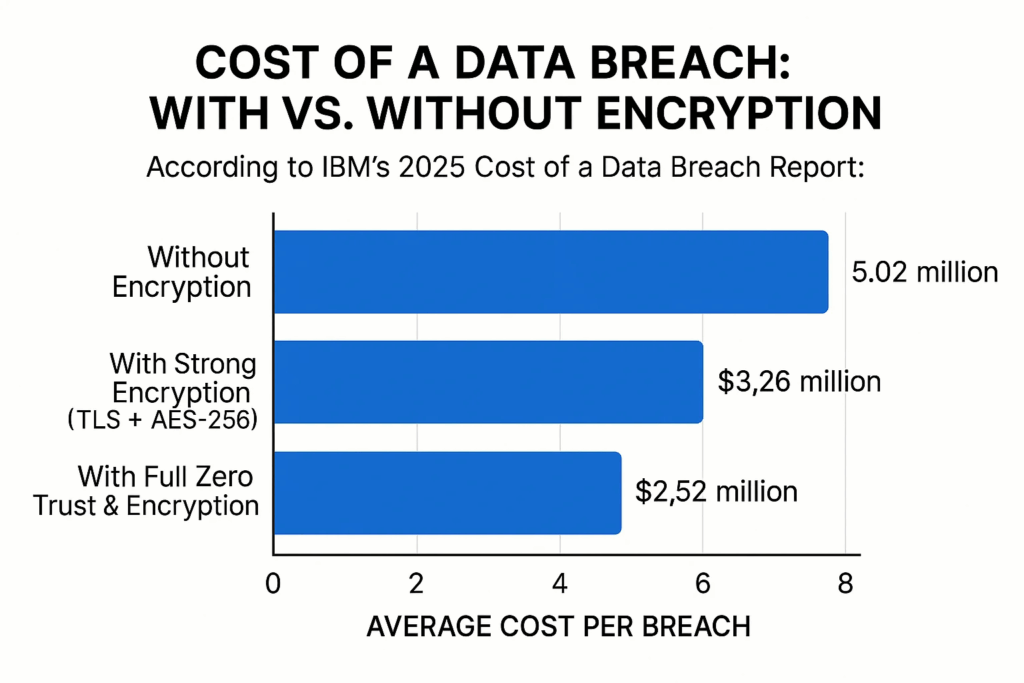
Roughly a third of companies experience stolen data due to a lack of encryption. Encryption protects your data even if a storage layer is exposed or a connection is intercepted. Enforcing TLS for data in transit and strong encryption for data at rest keeps sensitive information protected as it moves through your cloud environment. Plus, a breach costs up to $2.5 million less, compared to if data encryption isn’t in place.
12. Classify sensitive data and apply governance policies
You can’t protect cloud data you don’t know about. And cloud environments spread information across services faster than most teams expect. Classifying sensitive data gives you a clear map of what matters and where it lives. Once you know that, governance becomes easier to enforce.
13. Strengthen key management practices
Encryption only works if the keys behind it are handled carefully. Cloud environments generate a steady stream of new keys, tokens, and secrets, and they often outlive the projects they were created for. Using managed key services keeps them organized and reduces the chance that a forgotten key becomes an entry point for cyberattacks.
14. Back up critical data and test recovery workflows
Two out of three companies have lost major data this year. Cloud failures are rare, but data loss from human error or misconfigurations is far more common. Backups give you a safety net, but they only help if you know they work. Testing recovery workflows on a regular schedule shows you how long restoration takes, who needs to be involved, and where your procedures still need tightening. It’s a small effort that prevents a major setback later.
Secure workloads, networks, and APIs
Workloads shift quickly in the cloud, and every new service introduces configuration choices that influence your overall risk. Strong workload and network security help you close gaps before attackers can use them to pivot or escalate access.
15. Patch cloud workloads on a consistent schedule
Cloud workloads change often. And each update can introduce new vulnerabilities if it isn’t patched quickly. A consistent patching schedule keeps those gaps short-lived. Automating updates where possible helps your teams stay ahead, especially in environments where containers, functions, and virtual machines spin up and down throughout the day.
16. Harden network paths and restrict unnecessary ports
Open ports and broad network rules make it easier for cybercriminals to break through. Tightening these paths reduces unnecessary exposure and gives you clearer control over how services communicate. Reviewing rules regularly, especially as new workloads are deployed, helps you catch outdated policies and keep your network surface limited to what your applications genuinely need. A Zero Trust security model helps strengthen these controls by treating every connection as untrusted until proven otherwise.
17. Secure APIs with strong authentication and rate limits
APIs connect most modern cloud services, which makes them a reliable target for attacks. Weak authentication or overly generous rate limits can turn a simple endpoint into a direct path to sensitive systems. Strengthening how your APIs verify requests, and limiting how often those requests can be made, helps you contain abuse and keep integrations operating safely at scale.
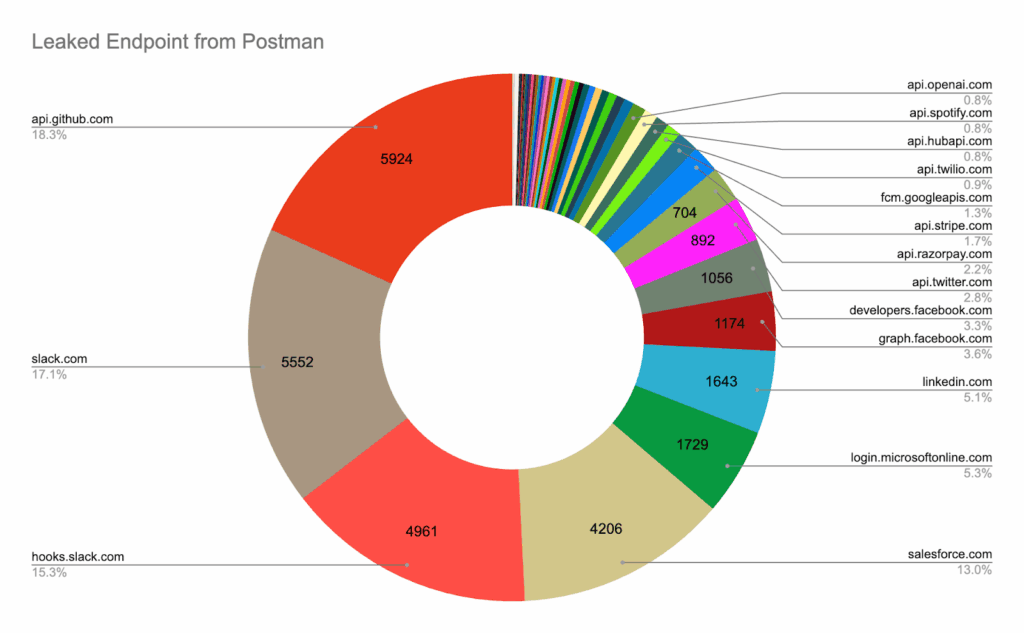
A recent Postman breach exposed 30,000 public workspaces containing live API keys and access tokens. Many of these provided direct access to production systems, showing how a single exposed API secret can undermine even tightly controlled services.
18. Secure containers, functions, and other cloud-native workloads
Cloud-native workloads spin up quickly and run with their own dependencies, which means vulnerabilities can move just as fast. Securing these components starts with trusted images, strong runtime controls, and clear separation between services. When you treat each workload as its own security boundary, you reduce the chance that a single flaw spreads across your environment.
19. Use cloud-native firewalls, WAFs, and workload protections
Cloud providers offer built-in controls that can filter traffic, block known attack patterns, and protect workloads without adding extra complexity. Enabling these tools gives you guardrails that adapt as services are created or moved. They also provide a clearer picture of what normal traffic looks like, which helps you spot unusual behavior before it turns into a larger incident.
Enhance monitoring, detection, and response
Cloud environments generate a constant flow of events, and the signals you need are often buried among routine activity. Effective monitoring helps you separate noise from real risk and gives your team the chance to act before an issue spreads.
20. Centralize logs and normalize cloud event data
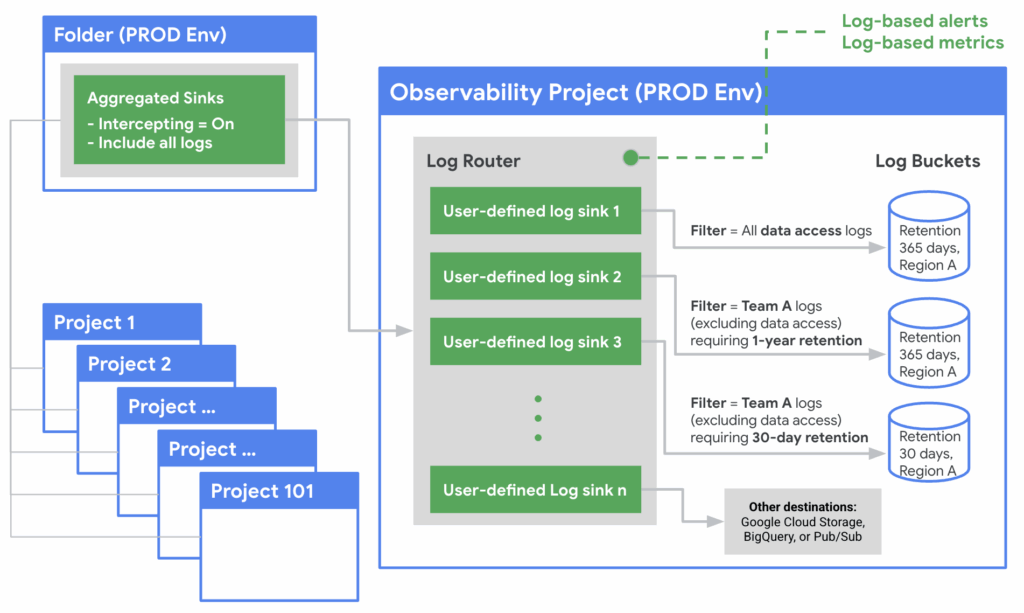
Each cloud service records activity in its own format, which makes investigations slow when logs are scattered across accounts. Centralizing them gives your team one place to search and helps you build a fuller picture of what happened.
The example below shows how Google Cloud structures centralized logging. Other providers may use different terminology. But they all aim to consolidate logs into one place with consistent retention and access controls.
21. Monitor cloud activity continuously
Cloud environments generate signals around the clock, and gaps in visibility give hackers time to move without being noticed. Continuous monitoring helps you catch suspicious behavior early, whether it’s an unexpected login, a new service spinning up, or a permission change that doesn’t match normal patterns. The sooner you see these cyber threats, the faster you can contain them.
22. Automate compliance monitoring and alerting
Regulatory compliance isn’t a one-and-done checkpoint. Cloud services evolve daily, regulations shift, and audit requirements accumulate. Automating compliance checks helps you continuously verify that your configurations, access controls, and data protections meet the standards you rely on. Alerts for deviations give you a chance to correct security risks quickly… before they become audit failures, fines, or breaches.
23. Run incident response drills and update playbooks
Cloud-based incidents unfold quickly, and your team can’t rely on muscle memory that was built around on-premises systems. Drills help you practice the steps you’ll need during a real event and reveal where handoffs or decisions slow things down. Updating your playbooks after each exercise keeps your security policies aligned with how your cloud environment actually works today.
24. Verify the security practices of your cloud service providers
Cloud providers handle the infrastructure, but their decisions still shape your risk management efforts. Reviewing how they approach cybersecurity, data security, and operational controls helps you understand where their responsibilities end and yours begin. This matters even more when you’re running a cloud native application, because the trust you place in your provider becomes part of your overall security posture.
If in doubt, here are some questions to ask your providers:
- How do you secure your data centers, and what physical and logical security controls are in place to protect cloud storage and compute infrastructure?
- What threat detection capabilities do you provide natively, and how do they integrate with the tools we already use?
- How do you manage the lifecycle of customer data, including retention, deletion, and movement across regions or services?
- What visibility do we have into your security controls, incident history, and third-party assessments?
- How do you validate the security of cloud native applications hosted on your platform, and what shared responsibilities should our team plan for?
Bonus: adopt an external threat intelligence tool
The 24 controls above address what’s inside your cloud environment. But breaches increasingly start outside it — with credentials already in circulation on dark web forums, misconfigured assets visible to anyone with a Shodan account, or API keys pushed to public repositories by developers using AI coding tools.
In June 2025, 16 billion credentials compiled from infostealer logs were made available to attackers — many of them valid cloud platform logins that organisations had no idea were circulating. By the time a credential appears in a breach notification, it has typically been available to attackers for months.
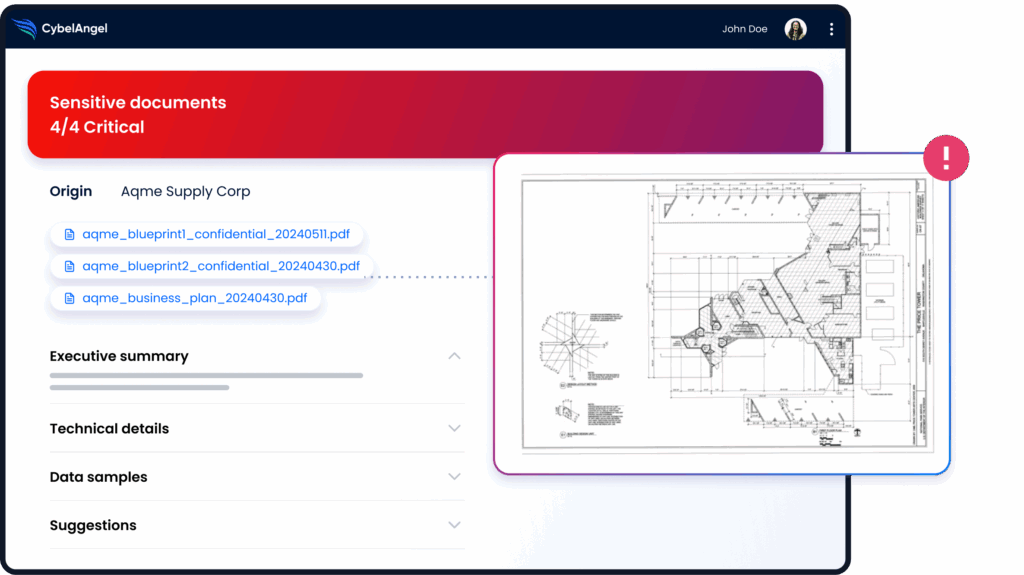
CybelAngel’s attack surface management continuously monitors your external perimeter — discovering exposed cloud assets, credentials circulating on dark web channels, and data leaks across public repositories — alerting your team before attackers act on what they find.
About the author